Tag: code

  • My local transcription pipeline.

    My local transcription pipeline.

    Be Brave Enough To Suck At Something New.

    “Beta Beta. I’m not a tomato.”
    Transcription time.

    Let me explain what I’ve been up to. So I got it in my head that if I’m going to share ideas, thoughts and projects, that the best way for me to do it was audio file recordings. So I’m not typing.

    This isn’t a tutorial. It’s a description of a system I trust enough to run unattended

    I wasn’t trying to build an AI product.

    I was trying to remove friction from my thinking.

    I record ideas when I walk, when I’m tired, when typing feels like work. What I wanted was a system that respected that reality — not one that asked me to adapt to it.

    I wanted a way to record my thoughts out loud and have them turn into usable text automatically.

    • No subscriptions.
    • No dashboards.
    • No “AI workspace.”
    • No babysitting
    • full privacy and content ownership

    Just: record audio → drop it in a folder → get a transcript. And sometimes, a WordPress draft waiting for me.

    Most tools that do this well cost money, require logins, or quietly train on your data. So I built my own local transcription and publishing pipeline on macOS instead — using my GPU, native tools, and a small amount of glue code.

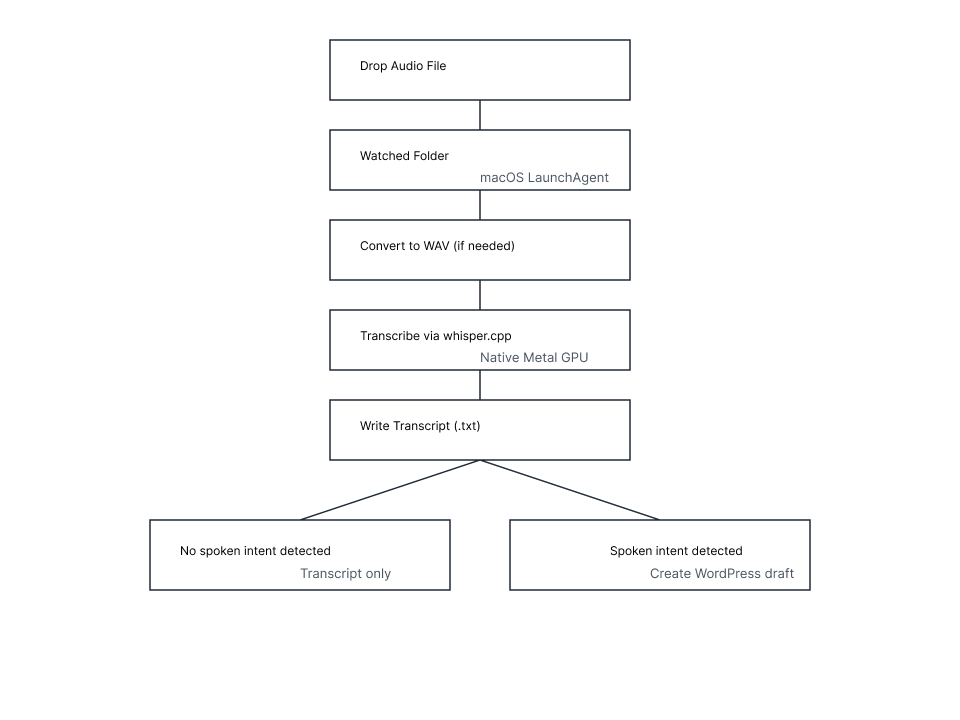
    Here’s what the system does:

    • Watches a folder for audio files
    • Converts them if needed
    • Transcribes locally using my Mac’s GPU
    • Writes a clean text file
    • Optionally creates a WordPress draft — only if I explicitly ask for it

    That’s it.


    subscribe & don’t miss out

    By subscribing to my newsletter you will receive updates on new content when I publish.

    Your email address is sacred, and never sold. I treat it like my own.


    Under the hood, this uses whisper.cpp, macOS LaunchAgents, and a small amount of Python glue — but the details matter less than the contract.

    This is talking that’s been transcribed to text. I built a software that runs on the macOS platform.

    You simply sit there and watch the progress go by, and you’ll end up seeing a transcript with TXT extension inside another folder. What’s the big deal, right?

    The audio file and the creation of the transcript never leaves my laptop. My audio file doesn’t go to the cloud.

    My transcription file does not come from the cloud.

    I have built a miniature AI workflow.

    What do I mean by that?

    My technical background is in solving problems inside software and computer systems. So I have the background to make this work. If all goes well, this audio file will go through what I’ve built.

    There’s a difference between:

    • automation that empowers judgment
    • automation that erodes it

    Most tools optimize for speed or scale. I wanted something that optimized for trust — especially when the system is running while I’m not paying attention.

    So if you are a developer on macOS or you like a little adventure on your laptop and are brave enough to jump in to the terminal, you can safely give it a go. However, I cannot be held liable if you somehow issue a command that erases your hard drive.

    My next step for this software is to create an installer file you can drop on your laptop and if you give it permission, it can install exactly the system I have working. It will install it on your laptop.

    Let me see how this experiment goes. Hopefully this will go through transcription with flying colors and at that point, let’s take a pause, regroup, check out the progress and then let’s move forward again. It doesn’t matter if it feels like an inchworm or hopping like a frog.

    Let’s see if we can get this to work.

    If interested, here is another post about this project.

    Here is a simple diagram showing what’s going on in this process.

    SVG image of the workflow at a high level

    OK, here is a video recording of the beta test with the results.

    It works!

    The transcription does take a long time. I need to deal with that. However big picture is that all the text above happened in that video. That’s a win for now.

    I can now record audio while half asleep, drop it in a folder, and walk away.

    Later, I’ll find a transcript waiting.
    Sometimes, a draft post.
    Always, something I chose.

    That’s the difference between a tool and a system.

    If interested, here is another post about this project.


    Transcribed locally using whisper.cpp (Metal)
    https://github.com/berchman/macos-whisper-metal

  • AI helped me develop a free solution to a real problem: using AI in 2025

    AI helped me develop a free solution to a real problem: using AI in 2025

    Stories about art, mental health and more. Art by Bert with AI.
    Stories about art, mental health and more. Art by Bert with AI.

    Hours Working With AI, Dozens of Dead Ends, and discovering the Right Way to Do Whisper on macOS.

    Sometimes progress doesn’t feel like progress. It feels like friction, wrong turns, and the quiet realization that the thing you’re trying to force is never going to cooperate.

    This was one of those hours.

    In roughly six hours of real human time, I managed to:

    • Diagnose Python version incompatibilities
    • Run headlong into PEP 668 and Homebrew’s “externally managed” rules
    • Set up and tear down multiple virtual environments
    • Confirm GPU availability on Apple Silicon
    • Discover numerical instability with MPS-backed PyTorch inference
    • Identify backend limitations in popular Python ML stacks
    • Switch architectures entirely
    • And finally land on the correct long-term solution

    Not the “it works on my machine” solution. The durable one.

    This post is about how I got there, and more importantly, what changed in my thinking along the way.


    The Trap: Python Everywhere, All the Time

    My first instinct was predictable. Whisper transcription? Python.

    Faster-Whisper. Torch. MPS. Virtual environments. Requirements files.

    And to be fair, that path mostly works. Until it doesn’t.

    On macOS with Apple Silicon, Python ML stacks sit at an awkward intersection:

    • PyTorch supports MPS, but not all models behave well
    • Some backends silently fall back to CPU
    • Others appear to run on GPU while producing NaNs
    • Version pinning becomes a minefield
    • One Homebrew update can break everything

    You only find out after you’ve already invested time and energy trying to stabilize a system that fundamentally does not want to be stable.

    That’s when the signal finally cut through the noise.


    The Bigger Takeaway (This Is the Real Value)

    I learned a durable rule that I’ll carry forward:

    This isn’t an anti-Python stance. It’s about choosing the right tool for the job.

    Python remains excellent for:

    • Glue code
    • Orchestration
    • Text processing
    • Automation
    • Pipelines that coordinate other tools

    But it is not ideal for:

    • Long-running GPU inference
    • Fire-and-forget background jobs
    • Stability-critical systems
    • Workflows that should survive OS upgrades untouched

    The Pivot: Native Whisper, Native Metal

    Once I stopped asking “How do I make Python behave?” and instead asked “What does macOS want me to do?”, the solution became obvious.

    whisper.cpp.

    A native implementation of Whisper, compiled directly for Apple Silicon, using Metal properly. No Python ML runtime. No torch. No MPS heuristics. No dependency roulette.

    Just:

    • A native binary
    • A Metal backend
    • Predictable performance
    • Deterministic behavior

    I rebuilt the system around that assumption instead of fighting it.


    What I Ended Up With (And Why It Matters)

    The final system is intentionally boring. That’s the highest compliment I can give it.

    I now have:

    • A watch-folder transcription system
    • Using a native Metal GPU backend
    • With zero Python ML dependencies
    • Fully automated
    • Crash-resistant
    • macOS-appropriate
    • Future-proof

    Audio files dropped into a folder get picked up, moved, transcribed, logged, and written out without intervention. Python still exists in the system, but only as glue and orchestration. The heavy lifting happens where it belongs: in native code.

    This is the setup people usually arrive at after months of trial and error. I got there in an afternoon because I stopped trying to be clever and started listening to the platform.


    The Project (If You Want the Source Code)

    The full pipeline is open-sourced here:

    https://github.com/berchman/macos-whisper-metal

    It includes:

    • A Metal-accelerated Whisper backend
    • A folder-watching automation script
    • Clear documentation
    • A frozen, reproducible system state
    • No hidden magic

    The Real Lesson

    This wasn’t about Whisper.

    It was about recognizing when a stack is fighting you instead of supporting you.

    About knowing when to stop patching and switch up entirely.

    About respecting the grain of the operating system instead of sanding against it.

    The tools we choose shape not just our code, but our cognitive load. The right architecture doesn’t just run faster. It lets you stop thinking about it. And sometimes, that’s the whole point.

    Be well.