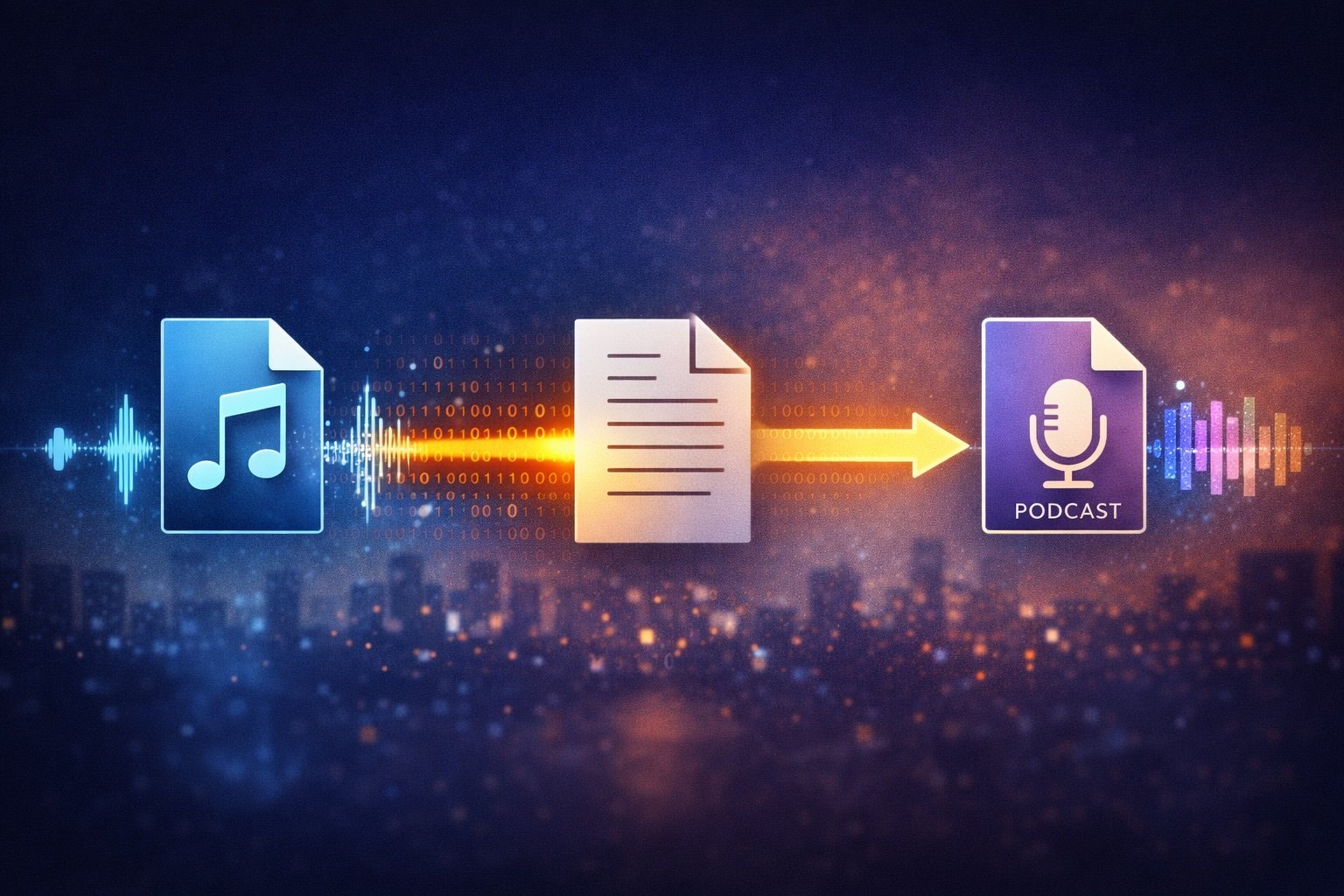
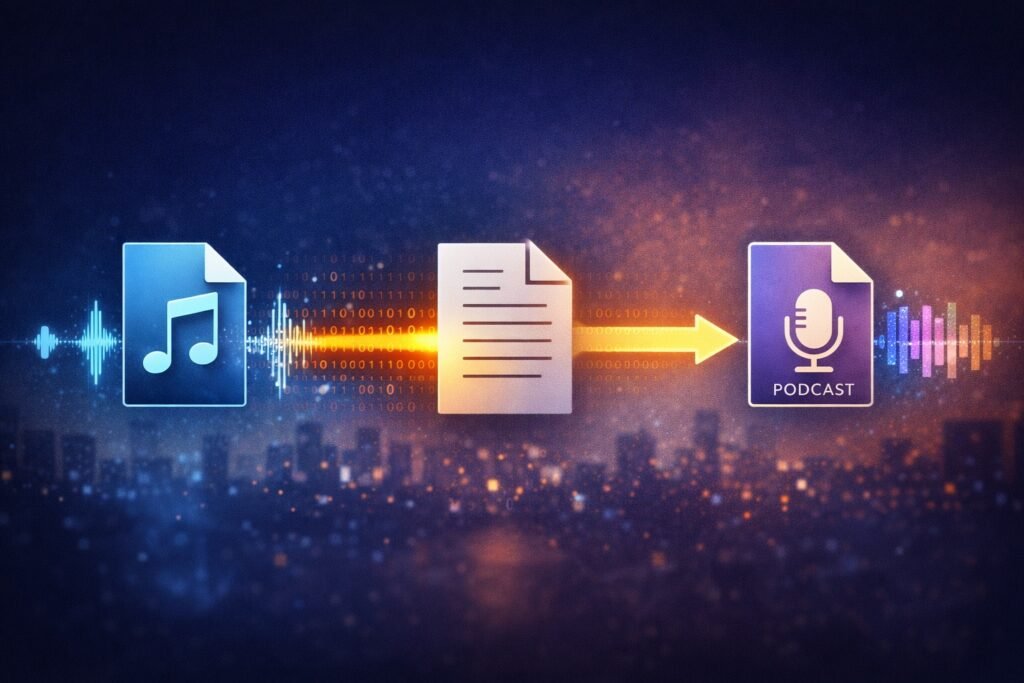
Audio in. Text out. Publishing only when I say so — all on my own machine. Image made with AI.
I’ve always wanted a transcription machine because for years, typing has been a bottleneck.
Not thinking. Not clarity. Not ideas.
Typing.
Back when the first iPhones came out, I had a simple wish:
let me talk, and let my words appear in my blog.
At the time, that was fantasy. Speech recognition existed, but only in research labs, big companies, or cloud services that didn’t really work well and definitely weren’t private. I moved on, kept typing, and learned to live with the speed limit.
Fast-forward to now.
Modern hardware.
Local machine learning.
Open models.
Enough computing power sitting on my desk to do what used to require a lab.
So I finally did it.
I built a fully local voice cloning and publishing pipeline on my own laptop. No cloud inference. No subscriptions. No dashboards. No usage caps. No data leaving my machine unless I explicitly choose it.
My intellectual property never leaves my machine unless I explicitly choose it.
That constraint mattered more than the tech itself.
What I wanted (and what I refused)
I didn’t want:
another AI subscription
another web interface
another service asking me to “upgrade” my own brain
another place my raw thoughts were stored on someone else’s servers
I wanted:
text → audio
audio → text
both directions
locally
for free
automated, but only when I asked for it
The tool I built
At a high level, the system now does two things:
Transcription
I record audio
Drop it in a folder
Whisper runs locally on Apple Silicon using Metal
Clean, readable text appears
Optional publishing happens only if I explicitly speak intent
Voice synthesis
I provide my own voice reference
Text files dropped into a folder become .m4a files
The voice is mine
The processing is local
The output is mine to keep or discard
No GPU calls inside Python ML stacks.
No fragile cloud dependencies.
No long-running services pretending to be “magic.”
“Beta Beta. I’m not a tomato.” Transcription time.
Let me explain what I’ve been up to. So I got it in my head that if I’m going to share ideas, thoughts and projects, that the best way for me to do it was audio file recordings. So I’m not typing.
This isn’t a tutorial. It’s a description of a system I trust enough to run unattended
I wasn’t trying to build an AI product.
I was trying to remove friction from my thinking.
I record ideas when I walk, when I’m tired, when typing feels like work. What I wanted was a system that respected that reality — not one that asked me to adapt to it.
I wanted a way to record my thoughts out loud and have them turn into usable text automatically.
No subscriptions.
No dashboards.
No “AI workspace.”
No babysitting
full privacy and content ownership
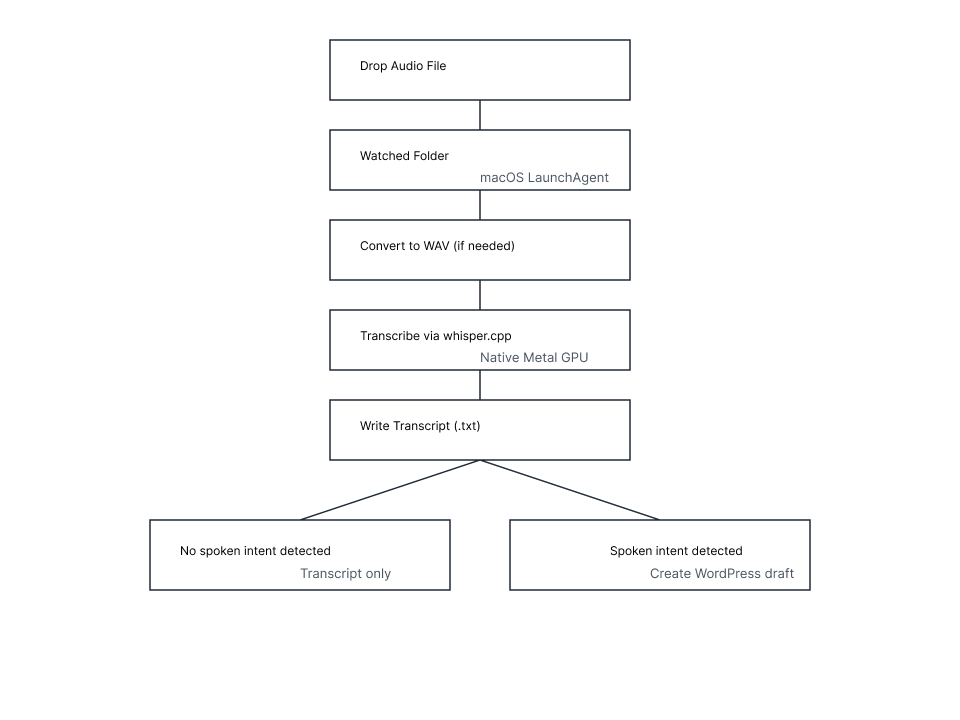
Just: record audio → drop it in a folder → get a transcript. And sometimes, a WordPress draft waiting for me.
Most tools that do this well cost money, require logins, or quietly train on your data. So I built my own local transcription and publishing pipeline on macOS instead — using my GPU, native tools, and a small amount of glue code.
Here’s what the system does:
Watches a folder for audio files
Converts them if needed
Transcribes locally using my Mac’s GPU
Writes a clean text file
Optionally creates a WordPress draft — only if I explicitly ask for it
That’s it.
subscribe & don’t miss out
By subscribing to my newsletter you will receive updates on new content when I publish.
Your email address is sacred, and never sold. I treat it like my own.
Under the hood, this uses whisper.cpp, macOS LaunchAgents, and a small amount of Python glue — but the details matter less than the contract.
This is talking that’s been transcribed to text. I built a software that runs on the macOS platform.
You simply sit there and watch the progress go by, and you’ll end up seeing a transcript with TXT extension inside another folder. What’s the big deal, right?
The audio file and the creation of the transcript never leaves my laptop. My audio file doesn’t go to the cloud.
My transcription file does not come from the cloud.
I have built a miniature AI workflow.
What do I mean by that?
My technical background is in solving problems inside software and computer systems. So I have the background to make this work. If all goes well, this audio file will go through what I’ve built.
There’s a difference between:
automation that empowers judgment
automation that erodes it
Most tools optimize for speed or scale. I wanted something that optimized for trust — especially when the system is running while I’m not paying attention.
So if you are a developer on macOS or you like a little adventure on your laptop and are brave enough to jump in to the terminal, you can safely give it a go. However, I cannot be held liable if you somehow issue a command that erases your hard drive.
My next step for this software is to create an installer file you can drop on your laptop and if you give it permission, it can install exactly the system I have working. It will install it on your laptop.
Let me see how this experiment goes. Hopefully this will go through transcription with flying colors and at that point, let’s take a pause, regroup, check out the progress and then let’s move forward again. It doesn’t matter if it feels like an inchworm or hopping like a frog.
Here is a simple diagram showing what’s going on in this process.
OK, here is a video recording of the beta test with the results.
It works!
The transcription does take a long time. I need to deal with that. However big picture is that all the text above happened in that video. That’s a win for now.
I can now record audio while half asleep, drop it in a folder, and walk away.
Later, I’ll find a transcript waiting. Sometimes, a draft post. Always, something I chose.
That’s the difference between a tool and a system.
Hours Working With AI, Dozens of Dead Ends, and discovering the Right Way to Do Whisper on macOS.
Sometimes progress doesn’t feel like progress. It feels like friction, wrong turns, and the quiet realization that the thing you’re trying to force is never going to cooperate.
This was one of those hours.
In roughly six hours of real human time, I managed to:
Diagnose Python version incompatibilities
Run headlong into PEP 668 and Homebrew’s “externally managed” rules
Set up and tear down multiple virtual environments
Confirm GPU availability on Apple Silicon
Discover numerical instability with MPS-backed PyTorch inference
Identify backend limitations in popular Python ML stacks
Switch architectures entirely
And finally land on the correct long-term solution
Not the “it works on my machine” solution. The durable one.
This post is about how I got there, and more importantly, what changed in my thinking along the way.
The Trap: Python Everywhere, All the Time
My first instinct was predictable. Whisper transcription? Python.
And to be fair, that path mostly works. Until it doesn’t.
On macOS with Apple Silicon, Python ML stacks sit at an awkward intersection:
PyTorch supports MPS, but not all models behave well
Some backends silently fall back to CPU
Others appear to run on GPU while producing NaNs
Version pinning becomes a minefield
One Homebrew update can break everything
None of this is obvious at the start.
You only find out after you’ve already invested time and energy trying to stabilize a system that fundamentally does not want to be stable.
That’s when the signal finally cut through the noise.
The Bigger Takeaway (This Is the Real Value)
I learned a durable rule that I’ll carry forward:
On macOS + Apple Silicon, prefer native Metal tools over Python ML stacks for production workflows.
This isn’t an anti-Python stance. It’s about choosing the right tool for the job.
Python remains excellent for:
Glue code
Orchestration
Text processing
Automation
Pipelines that coordinate other tools
But it is not ideal for:
Long-running GPU inference
Fire-and-forget background jobs
Stability-critical systems
Workflows that should survive OS upgrades untouched
Trying to force Python into that role on macOS is like building a house on sand and then blaming the hammer.
The Pivot: Native Whisper, Native Metal
Once I stopped asking “How do I make Python behave?” and instead asked “What does macOS want me to do?”, the solution became obvious.
whisper.cpp.
A native implementation of Whisper, compiled directly for Apple Silicon, using Metal properly. No Python ML runtime. No torch. No MPS heuristics. No dependency roulette.
Just:
A native binary
A Metal backend
Predictable performance
Deterministic behavior
I rebuilt the system around that assumption instead of fighting it.
What I Ended Up With (And Why It Matters)
The final system is intentionally boring. That’s the highest compliment I can give it.
I now have:
A watch-folder transcription system
Using a native Metal GPU backend
With zero Python ML dependencies
Fully automated
Crash-resistant
macOS-appropriate
Future-proof
Audio files dropped into a folder get picked up, moved, transcribed, logged, and written out without intervention. Python still exists in the system, but only as glue and orchestration. The heavy lifting happens where it belongs: in native code.
This is the setup people usually arrive at after months of trial and error. I got there in an afternoon because I stopped trying to be clever and started listening to the platform.
If you’re on Apple Silicon and want transcription that just works, this is a sane place to start.
The Real Lesson
This wasn’t about Whisper.
It was about recognizing when a stack is fighting you instead of supporting you.
About knowing when to stop patching and switch up entirely.
About respecting the grain of the operating system instead of sanding against it.
The tools we choose shape not just our code, but our cognitive load. The right architecture doesn’t just run faster. It lets you stop thinking about it. And sometimes, that’s the whole point.
Focus Music and My Struggle With Concentration in a World Full of Noise
Focusing on a single task has felt like trying to read in the middle of a concert. My mind darts from thought to thought—unfinished emails, buzzing notifications, ideas half-written and instantly forgotten. The world demands more of our attention than ever, and I found myself chronically depleted and deeply frustrated.
It wasn’t just about being unproductive. It was emotional. The guilt of not finishing things, the anxiety of falling behind—it all added up. I tried apps, caffeine, even silence. Nothing seemed to bring that mental click I was searching for.
Discovering MindAmend: A Personal Turning Point
One day, after stumbling through another disjointed work session, I came across a YouTube recommendation: @MindAmend, created by Jason Lewis. I clicked. The screen faded into soft visuals. No ads. No voices. Just music—not music, really, but a soundscape.
I let it play in the background while I tackled a small task. To my surprise, I didn’t check my phone once. My thoughts slowed. I completed my work, and even kept going. It wasn’t magic—it was the first moment in a long time when I felt centered, calm, and capable.
I’ve tried lo-fi playlists and nature sounds. They’re relaxing, sure, but MindAmend is different. Jason Lewis creates his tracks using isochronic tones, a form of brainwave entrainment where distinct beats pulse at specific frequencies. Unlike binaural beats, these don’t require headphones—and they work more directly.
The sounds feel engineered to support a purpose—not just to sound good. Whether I’m writing, brainstorming, or decompressing, there’s a track that meets me where I am.
The Science Behind the Calm: Brainwave Entrainment Explained
Isochronic tones help the brain shift into desired states by using rhythmic, evenly spaced pulses. When listened to over time, these tones guide your brainwaves into frequencies associated with deep focus, relaxation, or creative flow. It’s like tuning your mental radio to the right channel—alpha for calm, beta for alert focus, gamma for peak concentration.
A 2024 neurophysiology study also demonstrated a significant finding. Isochronic tones showed a ~15% increase in attention-related EEG potential at the prefrontal cortex. This is in comparison to binaural beats.
Subtle tones that don’t distract, but hold your attention just enough to anchor you in the moment.
For me, it’s like flipping a switch. Within five minutes, I stop fidgeting. Within ten, I’m in flow.
The YouTube comments say the same:
“I just finished a three-hour study session.” “Haven’t felt this grounded in weeks.” “This literally saved my focus.”
I couldn’t agree more.
My Daily Ritual and the Emotional Impact of Sound
I integrate focus music into my daily routine as a cornerstone of my productivity toolkit. I usually choose a task I’ve been putting off. This is writing, planning, or tackling a long article. Then, I press play on a track. Within minutes, the sounds create a steady pulse that anchors my attention.
The effect is subtle but powerful. These tones help shift my mindset from scattered to centered. Over time, this has built up into a habit of returning to calm focus, even when external distractions pile up.
From Overwhelm to Order: The Emotional Transformation
Isochronic tones helped me transition from mental chaos to emotional clarity. When my mind spins from anxiety or fatigue, these soundscapes provide structure. They ground me, slow down racing thoughts, and make way for inner peace.
What Jason Lewis Has Created Goes Beyond Music
This isn’t ambient noise or white sound—it’s a deliberate, precise design for mental performance. Jason Lewis’s productions are clean and consistent, tailored to facilitate brainwave entrainment. His tracks focus on listener experience rather than catchy melodies. For me, they feel like mental architecture, helping me build focus from the inside out.
Comments That Echo My Story
Scrolling MindAmend videos, I frequently see comments that mirror my own:
“I just finished writing eight pages while listening to this.” “This channel is the only way I can work through brain fog.”
It’s humbling and inspiring to know others are finding clarity through the same sounds that help me.
Practical Tips for Getting Started With Focus Music
Select a track that matches your goal—beta-frequency for focus, alpha or theta for relaxation or creative work.
Use moderately comfortable volume (not too loud), ideally with headphones or two-channel playback.
Time your work—try 25‑minute blocks with 5‑minute pauses to assess how you feel.
Pair it with a clean environment—minimal visual distractions amplify the effect.
Reflect after each session—note what tasks went well, how your mood changed, and use that feedback.
My Message to Anyone Struggling With Focus or Anxiety
Sound can be a first-line tool, accessible, free via YouTube, and non-invasive. You don’t need to be an expert to benefit—just be consistent and open-minded. Even if the effect feels subtle at first, persistence helps it build and compound over time, producing calmer clarity and better focus.
Conclusion: Healing Happens in Small, Consistent Waves of Sound
My experience with MindAmend focus music, especially those using carefully crafted isochronic tones, has transformed how I approach work, reading, and mental rest. What began as curiosity quickly became routine, and the sense of calm, clarity, and productivity I gained motivated me to keep coming back.
If chaos, distraction, or overwhelm rings familiar—this might help you too. Even small, incremental shifts through sound can create meaningful change. Healing and focus don’t always come in giant leaps—they often happen in steady, rhythmic waves.